


Introduction
We recently introduced an IcePanel plugin that lets you generate diagrams and models from your codebase automatically using Claude Code or GitHub Copilot. This is a new capability for architects to point an LLM at their code or images and import them into an IcePanel landscape: diagrams, model objects, connections, and more. It is perfect for cases like:
- Migrating diagrams from different tools or frameworks into IcePanel
- Onboarding onto new repos using IcePanel diagrams
- Automating diagram generation for teams
- Verifying changes in the architecture
To get started, check out: https://github.com/IcePanel/icepanel-plugin
This plugin has four skills to get data into IcePanel. Instead of manually diagramming and translating diagrams from one tool to another, you point Claude Code at your repo(s). It will read the source code, build a model (objects and connections), and create diagrams in IcePanel through the API.
In this post, we’ll walk through one end-to-end example, then cover each skill.
What the plugin does
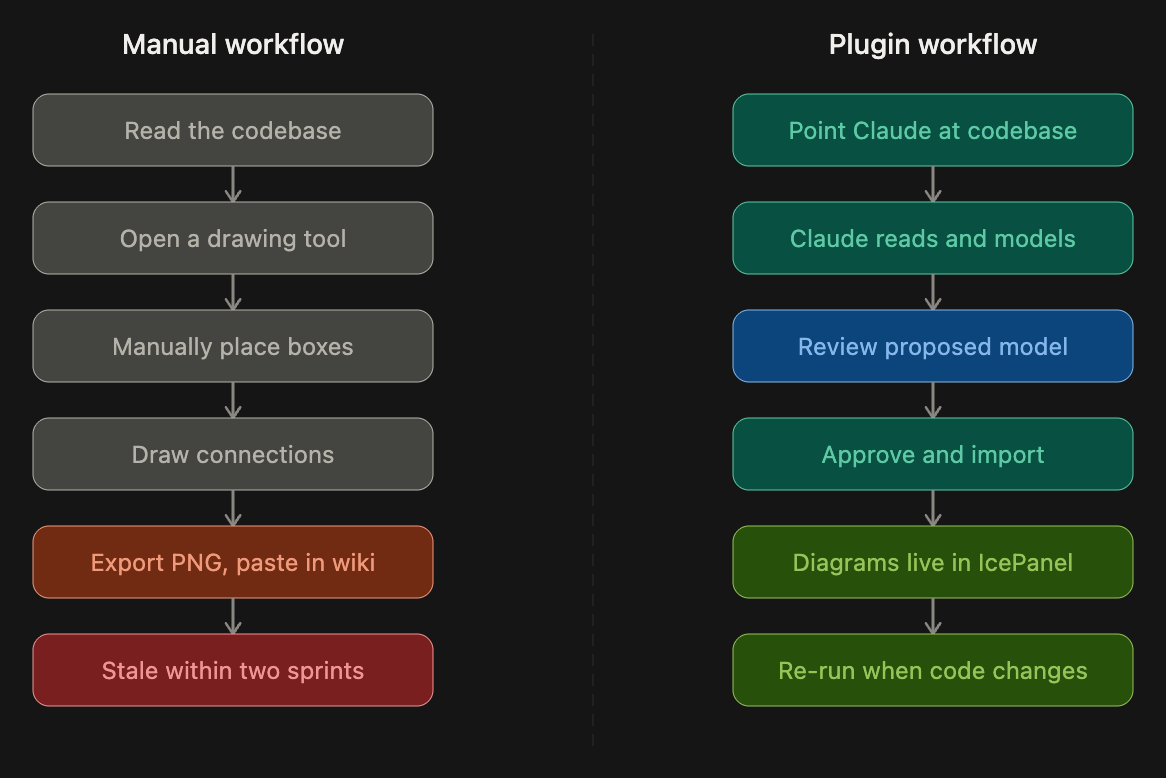
The current (manual) workflow for an architect looks like this: they inspect a code repository (e.g., collection of services bundled in a monorepo), ask other engineers for context on systems they’re less familiar with, understand the intricacies of these services (3rd party integrations and data flows), sketch out a rough diagram, and export a static image in a README or wiki page. Not only is this process slow, but it also depends on other engineers’ time and unshared context, is prone to human errors, and will become stale with more changes made in this repo (e.g., adding a new service).
This plugin automates the process and generates the diagrams fast, which can then be approved and adopted by the architect. This new workflow can be adopted by all engineers and re-run whenever architecture changes have been made, so the diagrams keep up with the code instead of drifting from it.
Example walkthrough: C4 diagrams from code
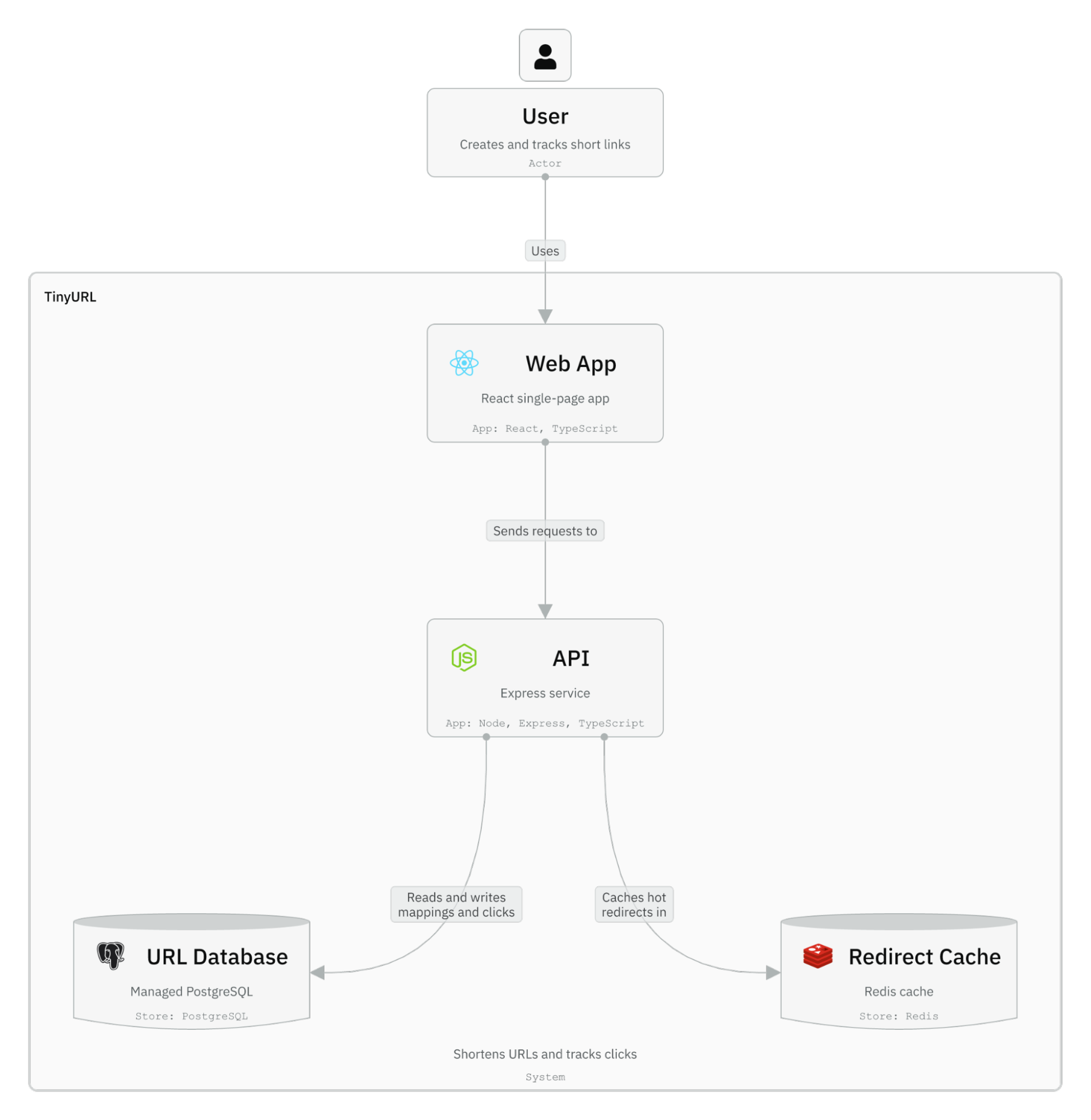
Let’s use a URL shortener (TinyURL) as an example. You inherit a repository that has multiple components:
- React frontend
- Backend API for URL creation and redirects
- Database for storing URL mappings
- Cache for popular URL redirects
First, you run a Claude Code session and install the plugin:
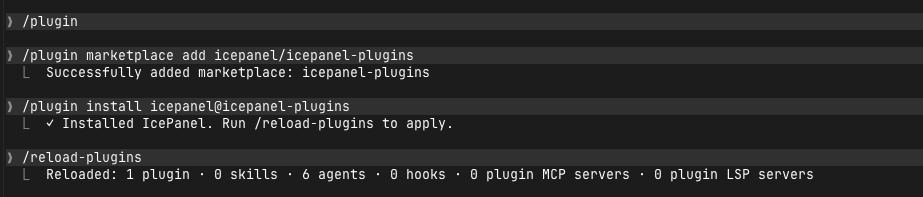
Then you prompt:
“Read through this codebase and create a C4 model for the URL shortener. Build Level 1 (Context) and Level 2 (Container) diagrams. Use the creating-c4-diagrams skill to import into IcePanel.”
Note: Claude will usually pick the skill on its own, but you can still reference it in the prompt just in case.
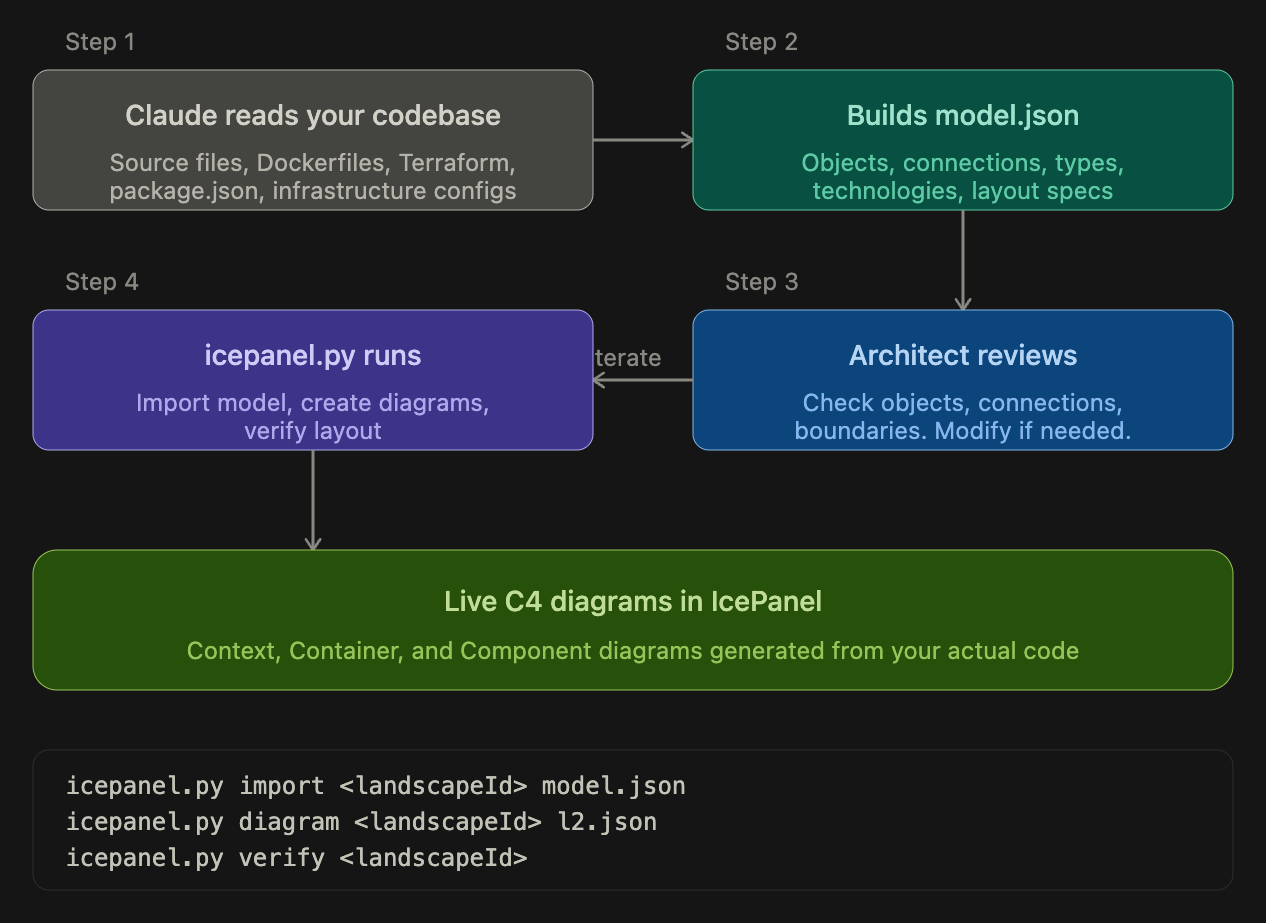
Once you run the prompt, it will use the skill and available IcePanel APIs to read, create, and upload IcePanel objects. Claude Code will first build the model and show you the proposed output before uploading to IcePanel. Note: API access requires a paid IcePanel plan.
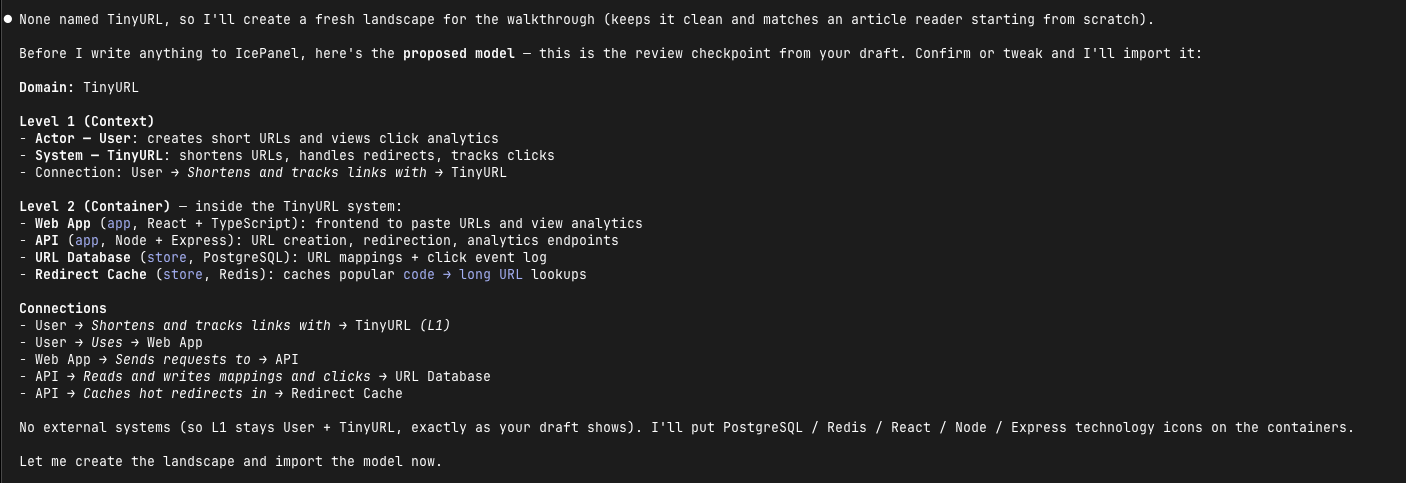
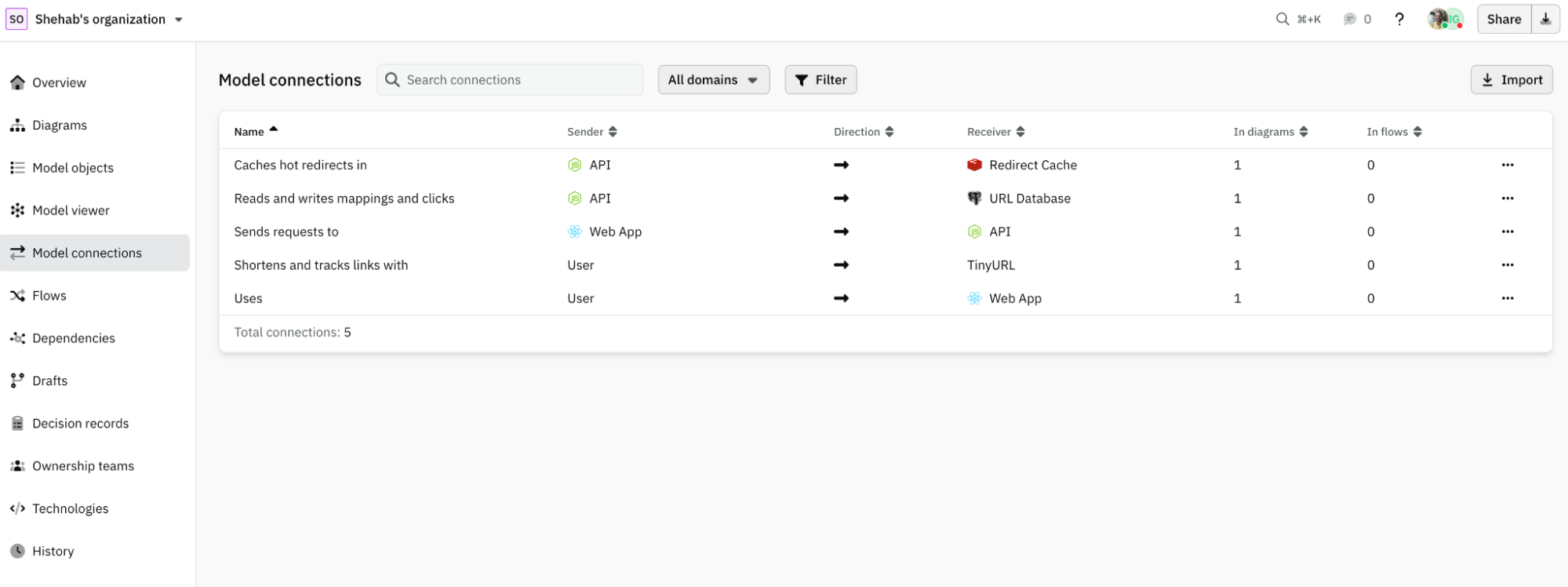
Once you grant the import permission, it will call relevant APIs to upload the data model and generate C4 diagrams (in this case Context and Container diagrams). The screenshots below show a new landscape with defined objects and connections called TinyURL: https://s.icepanel.io/GJSMgvtqJLkB4w/UnMs
Skills in the IcePanel plugin
1. Creating C4 diagrams
creating-c4-diagrams is the core skill and the one you’ll use most. You point Claude Code at a codebase, it reads through your project structure (source files, Dockerfiles, Terraform configs, package manifests), identifies the systems, services, data stores, and external dependencies, and builds a C4 model file. From there, a helper script handles the IcePanel API calls: importing the model into IcePanel, creating diagrams with explicit layout, and verifying that nothing overlaps or breaks visually. This skill also works with images/screenshots of diagrams. Use this when you have a codebase and want to generate architecture diagrams from it.
2. Importing Structurizr DSL
importing-structurizr-dsl is for teams who already model in code using a text-based domain specific language (DSL). If you have a workspace.dsl in a repo, point Claude Code at it. The skill maps actors, software systems, containers and their relationships onto IcePanel objects and connections, and turns your views into diagrams. Like the others, it shows you the model before calling the IcePanel API.
3. Importing context maps
translating-context-maps is for teams who practice Domain-Driven Design (DDD). If your team has context maps sketched on Excalidraw, Miro or on a whiteboard, take screenshots or photographs and point Claude Code at it. The skill identifies bounded contexts and maps them to groups with systems inside. It detects upstream/downstream relationships and DDD patterns and applies them as tags on the connections. It produces a model file and hands off to the core skill creating-c4-diagrams for the import.
4. Importing Mermaid
importing-mermaid-c4 is for teams who already document architecture in Mermaid C4 syntax. If you have C4 diagram blocks in Markdown files or READMEs, this skill parses them, merges multiple diagrams by alias into one model and asks for review before any API calls. Use this when you want to migrate existing Mermaid documentation into IcePanel without starting from scratch.
Conclusion
Diagrams go stale because drawing them by hand is slow and nobody repeats it. The IcePanel plugin turns that into a workflow you can re-run. It translates code, Structurizr, Mermaid and context maps into C4 models and diagrams in IcePanel, and waits for human approval before uploading to IcePanel. In this post, we’ve covered an example with the TinyURL system.